Dota 2 mods: D2A Mods
A free Windows app with 27 of our own mods and over 200 community mods. More FPS without weather and extra effects, no grass and bushes, dark terrain, high-contrast creep HP, fonts, cursors, menu backgrounds and hero recolours. Tick the mods, press Install, the app finds Dota by itself.
Visual and sound mods only, with no in-game advantage and no hooking into the Dota process. Game files stay untouched: mods go in as separate files and are removed with one button. Valve does not officially support mods.
Optimisation
☂ No weather FPS
Rain, snow, ash, leaves and other item weather. The biggest FPS gain in fights.
✦ No map ambient effects FPS
Fireflies, dust, glints and drips on terrains. No gameplay effect.
❦ No birds and bugs FPS
Bats, birds and bugs flying over the map.
✧ No cosmetic glow FPS
Idle effects on hero items: fire, sparks, haze. Abilities and their effects stay.
✉ No courier effects FPS
Fire, glow and trails on treasure couriers. The couriers stay.
◎ No emblems FPS
Event emblem auras around heroes.
◉ No ward skin effects FPS
Glow and particles on treasure wards. The wards look as usual.
▣ No building debris FPS
Explosions and debris when towers and statues fall.
✺ No event decorations FPS
Confetti, fireworks and fountain decorations from events.
⌂ No building and base effects FPS
Glow and smoke on buildings, lava and destruction at bases, outposts, fountains, statues, emblems. Glyph, Tormentor shield and tower projectiles stay. Based on the Minify list.
➶ Simple ranged attacks FPS
Less glow and sparks on ranged hero attacks. The projectile stays visible. Based on the Minify list.
✷ Simple spells and items FPS
Removes extra glow, sparks and smoke from default spells and items, the effects themselves stay. Lighter fights. Based on the Minify list.
♪ No map ambient sounds Sound
Map soundscape and animals. Gameplay sounds stay: horns, outposts, Tormentor, Twin Gates, trees, day and night.
Customisation
⊘ Mute chat wheel sounds Sound
Mutes the soundboard lines people spam in chat.
≈ No river Visual
Plain dark water instead of the river, no splashes, waterfalls or wading sounds. River vials are not shown either. Based on the Minify mod.
✎ No sprays Visual
Graffiti that players spray on the map is not shown. Based on the Minify list.
♫ No announcer Sound
The default announcer is silent: game start, runes, Roshan and the rest. Based on the Minify list.
✕ No kill streak lines Sound
No Rampage, Godlike and other kill streak shouts. Based on the Minify list.
☹ No taunt sounds Sound
Mutes hero taunt sounds. The taunts are still visible. Based on the Minify list.
☊ No hero voice lines Sound
Heroes stay quiet during the game: lines on moving, attacking and buying. The chat wheel goes quiet too. Based on the Minify list.
✋ No high five effects Visual
Bursts and overhead pictures from high fives.
☺ No taunt effects Visual
Particles from hero taunts. The animation stays.
◐ Dark terrain (Minify) Visual
Gray map tiles, fog lines instead of haze, dark water. Needs the default terrain. Replaces D2PFX fog shaders and terrains. A Minify mod.
❀ No bushes and props (Minify) Visual
Removes bushes, flowers, rocks and small ground props, leaving only tiles. Trees stay. Needs the default terrain. A Minify mod.
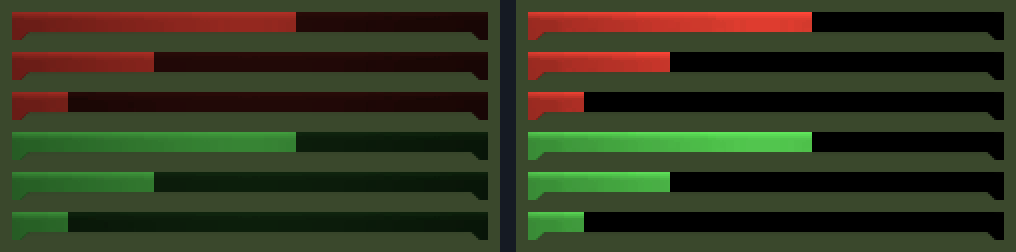
▰ High-contrast creep HP Visual
Missing creep HP is black and the rest is brighter, so what is left stands out. The game adds the team colour itself, only the brightness changes.
✦ Hero customisation Visual
Your own colours for any hero and its parts, plus ability icons. Paint in the 3D editor, only you see it.
Aa English interface Visual
For English players: set -language dutch in the launch options, mods will work and the text stays English. Also works with Russian voices.
How to install the mods
- Download D2AMods.exe and close Dota 2.
- Run it. If Windows warns about an unknown publisher: More info → Run anyway.
- Tick the mods and press Install.
- If a Dota update turns the mods off, press Install again. To undo everything: Remove all mods.
Community mods: Dota2PornFx, Minify. Hero customisation · Mods in the app